We are not longer providing 347 form because all data is automatically submited daily on both sales and purchases to the Tax Agency through the SII (Immediate Supply of Information). Therefore, we do not have legal obligation to supply this information.
As a courtesy and to assist you, we provide you access to invoices in digital format so that you can easily download them.
Here’s how you can download an invoice summary that may help you with your form 347-
1. Go to www.makro.es and sign in with your digital account.
If you don’t have one, create it and link your card. If you have several cards, choose the account/card you want to access.
If you have any difficulties with this steps, please, let us know in order to assist you.
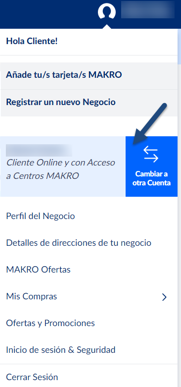
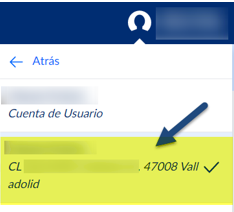
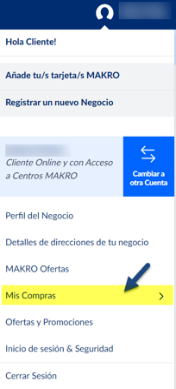
2. Then select “Mis Compras” > “Facturas electrónicas Makro” > “Resumen.”
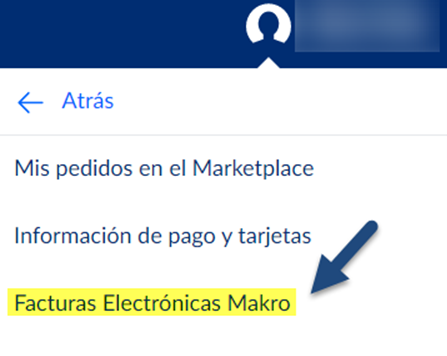
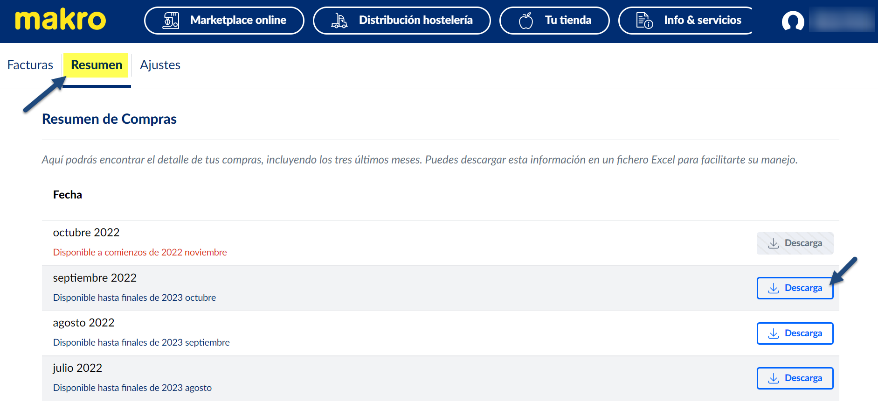
3. Select the Download option for each month you need.
In other words, if you need the full year, you will have to download all the months in which you made purchases.
The downloaded file will be a spreadsheet in “.ods” format, which can be opened with any spreadsheet program.
Once downloaded, you only need to add together the amounts “WITH VAT” and “WITHOUT VAT” for your 347 form.
Remember, if you need further information about your inquiry, you can contact us by calling 900 907 503 or through our contact section on our website https://www.makro.es/contacto-makro |
Was this article helpful?
That’s Great!
Thank you for your feedback
Sorry! We couldn't be helpful
Thank you for your feedback
Feedback sent
We appreciate your effort and will try to fix the article